Skip to content
EasyToPaste
Zero-knowledge encryption

Share a file or message that only the right person can open.

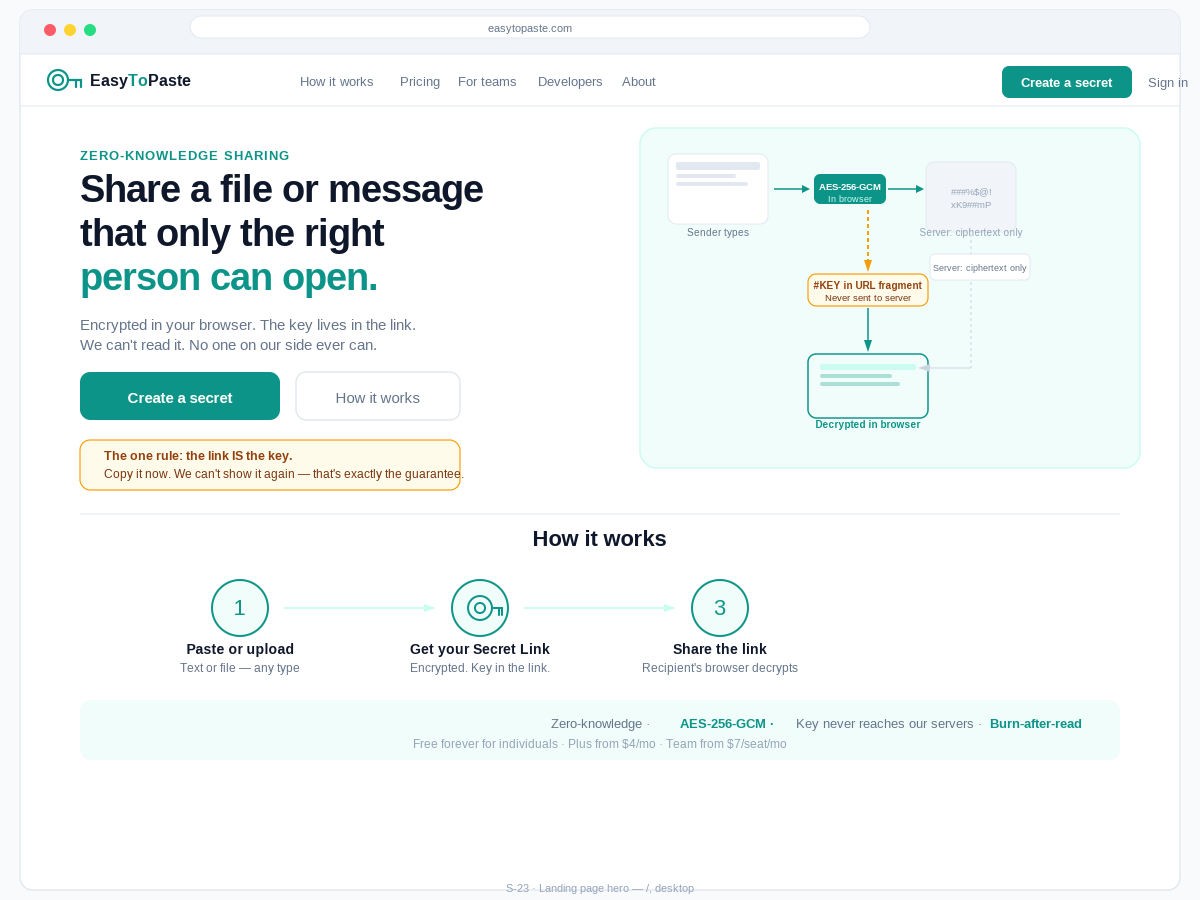
Encrypted in your browser. We never see your content — that's not a promise, it's how it's built.

No tracking script on this site — not even ours.

EasyToPaste zero-knowledge sharing — hero illustration

The one rule

The link is the key. Guard it — if it's lost, the secret is gone, even for us. That's what keeps it private.

See it in 66 seconds

A real screen recording of the live product — no narration, no account, nothing staged.

No sound: the video is silent and captioned.

Read the transcript
  1. 00: 00 A password pasted into chat stays readable in that chat for years.
  2. 00: 05 EasyToPaste encrypts in your browser. The server stores what it cannot read.
  3. 00: 11 Write it, your device encrypts it, you share the link. Only the link-holder can open it, because the key travels in the link.
  4. 00: 19 Open the app. No account is needed to create or send a secret.
  5. 00: 25 Type or drop in what you want to share.
  6. 00: 32 One-time: it burns after the first person opens it.
  7. 00: 39 Auto-deleted when the expiry runs out, even if nobody opens it.
  8. 00: 45 The recipient's browser decrypts it. Open the same link again and there is nothing behind it.
  9. 00: 53 We can see that a secret exists. We cannot see its contents or its key.
  10. 01: 01 easytopaste.com Free to try. No signup to create a secret.

How it works

  1. 1

    Write or pick a file

    Type a message or drag in a file. Nothing leaves your device yet.

  2. 2

    We scramble it on your device

    Strong encryption happens in your browser before anything is sent.

  3. 3

    Share the link

    Only the link-holder can open it. Even we can't.

What we can and can't see

EasyToPaste can see EasyToPaste can never see
That a secret exists, its type and size The contents of any secret
When it was created, and whether it's still live The decryption key or passphrase
Who created it (if signed in) A file's name, or the text you pasted
Org metadata for audit (Team tier, planned — not available yet) Anything an admin could decrypt — they can't

Plans at a glance

Zero-knowledge on every plan.

Free

50 secrets/day signed in, 10 anonymous

$0
  • 50 secrets/day signed in, 10 anonymous
Start free
Most popular

Plus

Unlimited daily creates, larger uploads

$4/mo
  • Unlimited daily creates, larger uploads
Get Plus

Team

Per-seat billing, and a daily cap far above Free

$6
  • Per-seat billing, and a daily cap far above Free
Talk to us

Enterprise

A daily quota set for your account, security review, premium support

Custom
  • A daily quota set for your account, security review, premium support
Talk to us

Built for everyone

Individuals

Share passwords, files, and credentials privately.

Start free →

Teams

Per-seat billing and a much higher daily cap for a group.

For teams →

Developers

REST API with copy-paste examples in five languages. Zero-knowledge by default.

For developers →

From the blog

Get updates

Occasional EasyToPaste updates — new features, and what changed about how your secrets are handled.

We email you a confirmation link first. Without that click nothing is sent. Every update carries a one-click unsubscribe link, and your address goes to nobody else.

One-time secret links, answered

The questions people actually type into a search box before they paste a password into a web page.

What is a one-time secret?
A one-time secret is a password, key, file or message you hand over through a link that works once. The recipient opens the link, reads it, and the record is deleted — so the secret stops living in a chat thread or a mailbox where anyone with later access can scroll back and find it. On EasyToPaste the content is encrypted in your browser before anything is uploaded.
How do I send a one-time secret link?
Paste the text or pick the file, choose how long the link may stay unopened, and copy the link you get back. No account is needed to send one. Your browser generates the encryption key and keeps it in the part of the link after the #, which browsers do not transmit, so the server stores ciphertext it cannot decrypt.
Does the link really self-destruct?
The record is deleted when the link is read, or when it expires - whichever comes first - and after that the link returns nothing to anyone, including us. What survives that deletion has two branches, and we would rather state them than round them off: a small secret lives inside the record and goes with it, leaving only the database-backup window, which keeps a deleted record restorable for up to 35 days. The second branch is an uploaded attachment, held as a separate encrypted object. The storage lifecycle rule on that bucket clears the object about 38 days after it was created. In both cases the ciphertext is unreadable, because the key was never ours.
Is it free to send a one-time secret?
Yes. Sending without an account is free, capped at 10 links a day per network address with up to 1 MB per upload; a free account raises that to 50 links a day and 20 MB. Links expire after 1 day by default and 30 days at the most, on every tier.
Will I be told when my one-time secret is opened?
No read receipt, and we would rather say so than imply one: the record is deleted both when it is read and when it expires, and nothing distinguishes the two. If you were signed in when you created the secret, it appears in your own list while it is still live and you can revoke it from there; once it ends the entry is gone.
Is a one-time secret link safer than emailing a password?
It removes the copy that lasts forever, which is the failure that actually bites: a password typed into an email or a chat sits in two mailboxes for years and is searchable by anyone who later gets into either. It does not protect you from malware on the recipient's machine, a screenshot, or someone forwarding what they read. Treat it as shortening exposure, not removing it.
Private by architecture — not just by promise.

Zero-knowledge encryption means we architected ourselves out of the ability to read your content. No promise required.

Read how it works →